How to Calculate Airbnb Profit Without an App: A Worked Example
Airbnb profit calculator steps for a two-bedroom listing, with a transparent monthly example, fee check, and spreadsheet method you can adapt to your own bookings.
By Airbnb Host Bundle by Cosmo Suite · Editorial policy
Published · 9 min read
Airbnb profit calculator means a simple way to compare booking income with the costs of running one listing. You can build one in a spreadsheet without a property-management app. The result depends on the bookings and costs you enter, so treat it as a record of your assumptions, not a forecast. A manual tracker such as the Airbnb Host Bundle property income and expense sheet can hold those monthly figures without connecting to your account.
This example uses a two-bedroom downtown condo for one hypothetical month. It separates guest charges, Airbnb's host fee, and operating costs so the payout does not get counted as profit. Airbnb's fee structure can vary by account and reservation. Check the transaction details before using a fee rate in your own sheet.
Airbnb Profit Calculation at a Glance
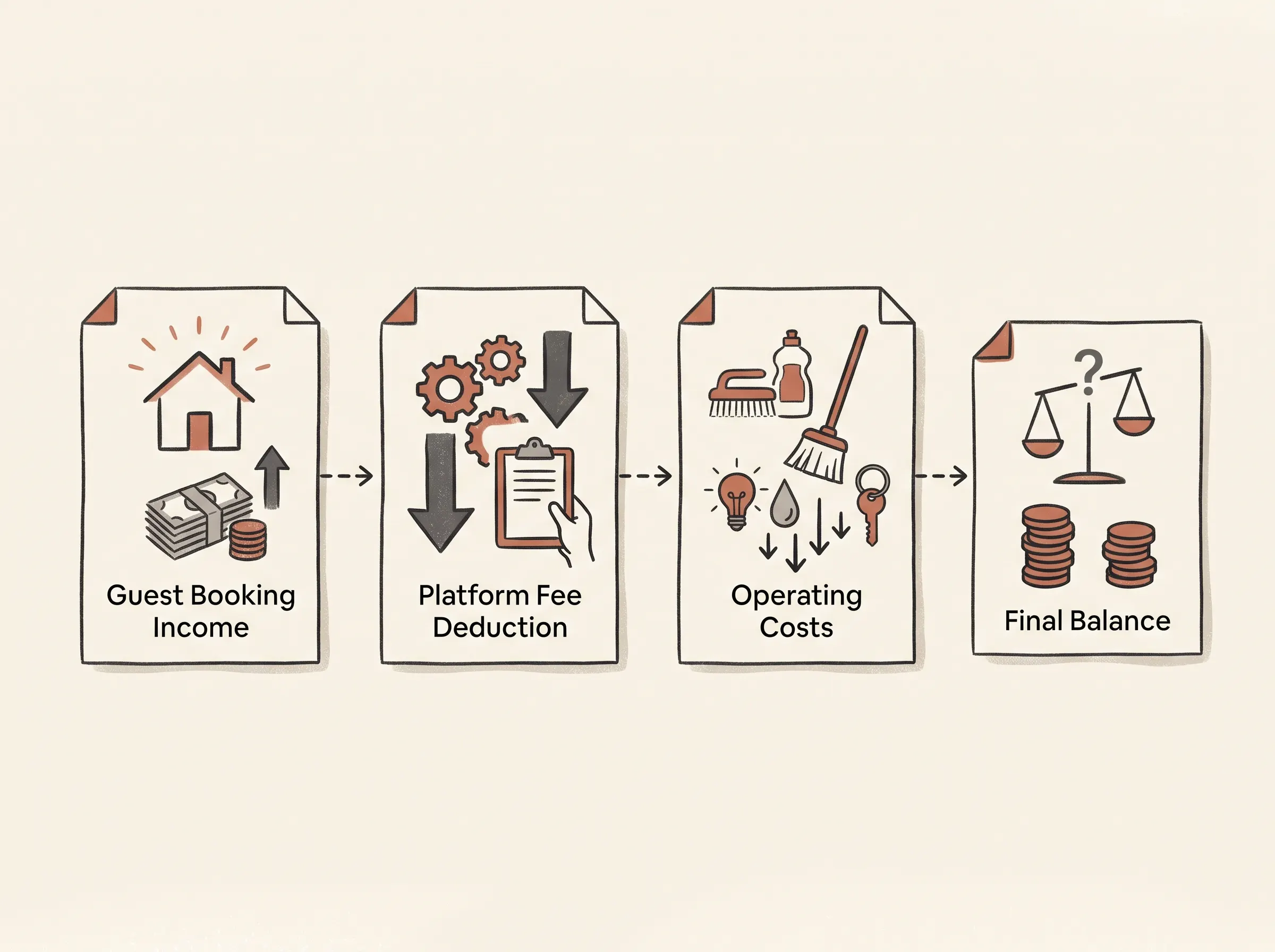
For a monthly estimate, calculate booking income, subtract platform and co-host deductions, then subtract the month's operating costs.
| Step | What to enter | Example for this month |
|---|---|---|
| Booking income | Nightly charges plus guest-paid optional fees | $3,200 |
| Host fee | The amount shown in Airbnb's transaction breakdown | $496 modeled assumption |
| Co-host payout | Any payout you share for those bookings | $0 in this example |
| Operating costs | Cleaning, supplies, utilities, internet, and other costs | $3,420 |
| Operating result | Booking income minus fee, payout, and costs | -$716 |
The example inputs only illustrate the arithmetic. They do not represent common rates or expected host income. The modeled fee uses 15.5% of the example's $3,200 booking subtotal. Airbnb says its single-fee structure is 15.5% for most hosts and notes that exceptions apply. The Help Center also says some hosts may remain on a split-fee structure (Airbnb Resource Center, October 13, 2026; Airbnb Help Center). Use the amount in your own transaction history instead of assuming this example's rate applies to you.
The result here is a modeled operating loss before tax and financing decisions. It shows why a calculator needs the costs a host actually pays, not just the booking total. Start with your own transaction statements and receipts. For a quick overview of the files a host may track, see the Airbnb templates for each guest moment.
What Counts as Airbnb Income in a Monthly Calculation?
Use the booking's itemized earnings as your starting point, then record guest charges and deductions in separate columns. A payout is the amount sent to you after some deductions. It is not the same as profit after operating expenses.
For the worked example, the host enters 16 booked nights at an assumed $180 per night. That gives $2,880 in nightly charges. Four reservations each include an $80 guest-paid cleaning charge, adding $320. The example booking subtotal is therefore $3,200.
Those figures describe a made-up month, not a local market rate. Replace them with your reservation details. Airbnb's payout guidance says the host's nightly price and optional charges are reduced by the host service fee and any co-host payout to determine the payout. A guest's total can also include a separate guest service fee and taxes.
Keep these amounts distinct in your sheet:
- Nightly charges: the nightly rate multiplied by nights, including any custom calendar pricing or discounts reflected in the reservation.
- Guest-paid optional charges: cleaning or other fees you add, if they appear in the reservation breakdown.
- Host fee: the amount Airbnb deducts under the fee structure applied to that booking.
- Co-host payout: any amount shared through Airbnb, recorded once.
- Payout received: the transaction amount Airbnb sends to your payout method.
If you begin with the payout received, do not subtract the host fee again. If you calculate from the booking subtotal, show the fee as its own deduction. This choice keeps the same amount from appearing twice.
How Do You Estimate the Airbnb Host Fee?
Use the fee shown on the reservation. Airbnb's Help Center describes split fees and a transition to a single host fee. Its October 2026 Resource Center says the 15.5% single fee applies to most hosts, with exceptions, and covers nightly prices and optional host fees. Some hosts may still use split fees, and older bookings can stay under their original terms. The fee guidance was checked on November 9, 2026.
For a rough check only, multiply the example's $3,200 subtotal by the stated 15.5% assumption:
$3,200 × 0.155 = $496
That leaves $2,704 before co-host payouts and the host's own operating costs. Your actual fee may differ. Airbnb says the transaction detail in Earnings shows the fee for a reservation. Open that breakdown and copy the fee amount into the matching row. The Airbnb service-fee explanation also describes which parts of a reservation subtotal the fee applies to.
Avoid adding a guest-paid service fee as host income. It belongs to Airbnb's guest-side price calculation. Also keep taxes out of a simple operating estimate until an accountant tells you how to record them for your location and situation.
Which Monthly Costs Belong in the Spreadsheet?
Enter costs you paid or accrued for the same month, with a note about how you assigned each one. The calculation is only useful when the time period and cost basis stay consistent.
The example uses these assumed operating costs:
| Example cost | Assumed amount | How to replace it |
|---|---|---|
| Cleaning paid by host | $400 | Four turns at an assumed $100 each |
| Supplies and restocking | $60 | Receipts for items used in this listing |
| Utilities | $230 | Monthly bill or a reasonable documented allocation |
| Internet | $60 | Listing's monthly share, if shared |
| Insurance | $110 | Your current bill or a documented monthly portion |
| Maintenance reserve | $120 | Your own planning amount; label it as an estimate |
| Software | $40 | Current invoices for tools used by this listing |
| Property cost allocation | $2,400 | The monthly amount you choose to include |
| Total | $3,420 | Add the rows above |
These amounts are placeholders, not market averages. A cleaning charge paid by a guest and the bill you pay a cleaner are separate entries. If the guest charge is $320 and you pay $400 for cleaning, the model records both. Do not treat the guest charge as the cleaner's actual cost.
Costs shared across multiple listings need a consistent allocation rule. You might split a bill by unit, nights booked, or another documented basis. Pick a method you can explain and use it each month. Large repairs, purchases, loan principal, depreciation, and tax deductions can have different accounting treatment, so keep them outside a basic operating result until you review them with a qualified tax or accounting professional.
Hosts who want a checklist for turns can compare these numbers with an Airbnb cleaning checklist by room. Keep one-time setup purchases apart from recurring monthly costs in your own records.

How Do You Build the Formula in Google Sheets?
Put one booking or one monthly total on each row, and keep inputs separate from formulas. This makes it easier to update a rate or correct a fee without rewriting the whole calculation.
For a simple monthly sheet, use columns such as:
| Column | Example entry |
|---|---|
| Month | November 2026 |
| Listing | Downtown condo |
| Booked nights | 16 |
| Nightly charges | $2,880 |
| Guest-paid fees | $320 |
| Host service fee | $496, copied from transaction detail |
| Co-host payout | $0 |
| Cleaning paid | $400 |
| Other operating costs | $3,020 |
The source example has $620 for supplies, utilities, internet, insurance, maintenance reserve, and software, plus a $2,400 property cost allocation. That sums to $3,020 beyond cleaning, making total costs $3,420. So in the sheet, use $3,020 for “Other operating costs” if cleaning has its own column.
If D2 is nightly charges, E2 is guest-paid fees, F2 is host service fee, G2 is co-host payout, and H2 is operating costs, a basic result formula is:
=D2+E2-F2-G2-H2
For a transparent gross subtotal, add a separate formula =D2+E2. Google Sheets can also total a column with its SUM function. Keep the host fee as a value copied from Airbnb's reservation details, or make it an editable rate assumption that is clearly labelled. Do not hard-code a fee percentage across every booking.
To check the example by hand: $2,880 plus $320 equals $3,200. Subtract the modeled $496 fee and $0 co-host payout, then subtract $3,420 in costs. The result is -$716. If the real transaction detail shows a different fee, replace $496 and the result will change.
Airbnb's payout guide explains the booking components and directs hosts to their Earnings details. The monthly view is your own working calculation. It does not replace Airbnb's transaction record or an accountant's books.
What Does the Result Tell You, and What Does It Leave Out?
Use the result to review the inputs you entered for one period. It cannot predict future bookings or determine how a property should be treated under every accounting method.
Use the result to ask practical questions. Did a one-time repair distort the month? Did you count a cleaning fee as income but forget the cleaner invoice? Did a payout arrive in a different month from the stay? If several listings share supplies or internet, did you apply the same allocation method to each?
Review the assumptions behind the example's -$716 result. It does not show that a two-bedroom listing typically loses money. Change the nightly charges, nights, actual fees, and cost rows to match your records. Use occupancy to compare scenarios, not as a promise about future reservations.
You can also check a simple break-even scenario from those same inputs. The example's $3,200 booking subtotal across 16 nights averages $200 per booked night. After the modeled 15.5% fee, that leaves $169 per night before operating costs. Divide $3,420 in modeled monthly costs by $169, then round up: this scenario would need 21 nights to cover the listed costs. It assumes the same average subtotal each night, no extra reservation effects, and no co-host payout. It is arithmetic for this example, not an occupancy prediction.
If you track multiple units, compare each listing on the same basis before combining totals. The property comparison and monthly dashboard in the Airbnb Host Bundle income and expense tracker are designed for this type of manual recordkeeping. The bundle also includes a 9-tab Google Sheets property tracker. It does not connect to Airbnb, import bookings automatically, set prices, or give tax advice.

A Simple Way to Keep the Estimate Useful
Update the calculation after reconciling each month's reservation details and receipts. Keep the assumptions visible next to the result so you can tell an actual transaction from a planning estimate.
At month end, check that booked nights match the reservation list, guest charges match the booking breakdown, and each Airbnb fee is recorded once. Match payouts to transactions rather than treating a bank deposit as the full revenue figure. Then enter cleaner invoices, supply purchases, utilities, and the other costs you included.
If you keep the source records beside the spreadsheet, you can correct a month without relying on memory. A simple note such as “$120 maintenance reserve, estimate” also prevents a planning amount from being mistaken for a paid invoice. The Airbnb guest book layout is for guest-facing information; keep money records in a separate host worksheet.
Why Trust This Article
The Cosmo Suite team made the Airbnb Host Bundle, which includes editable templates and a Google Sheets property tracker. We checked Airbnb's service-fee and payout guidance on November 9, 2026. The worked month uses clearly labeled assumptions, not customer results or market averages. Learn about Cosmo Suite and read the editorial policy for how we prepare and correct blog content.
The tracker is useful when you want a manual monthly view for one or more listings. Hosts who need bank feeds, bookkeeping reports, tax preparation, or automated channel data should compare dedicated accounting or property software and ask a qualified professional about their records.
Frequently asked questions
How do I calculate profit on an Airbnb?
Start with booking income and other guest charges, subtract the Airbnb host fee and any co-host payout, then subtract your operating costs for the same period. Keep the booking payout and the property's expenses separate so you do not count a fee twice.
Does Airbnb have a profit calculator for hosts?
Airbnb provides earning and payout details for listings and reservations. Those figures help you inspect a booking, while a monthly profit estimate also needs your own operating costs and assumptions.
What expenses should an Airbnb profit spreadsheet include?
List costs you pay to operate the listing, such as cleaning, supplies, utilities, internet, insurance, maintenance, software, and any rent or mortgage cost you choose to include. Keep tax treatment and capital costs separate for an accountant to review.
Should I include Airbnb's service fee in my calculation?
Yes, include the host fee once. Check the transaction breakdown for each reservation because fee structure and exceptions can vary. If your payout already subtracts the fee, do not subtract it again from that payout.
Can a spreadsheet tell me what my Airbnb will earn?
A spreadsheet can calculate a result from the bookings, rates, fees, and costs you enter. It cannot predict occupancy, future demand, local rules, or a guaranteed profit.